Network Fundamentals: Why Hubs Belong in a Museum (Not Your 2026 Lab)
Network Fundamentals: Why Hubs Belong in a Museum (Not Your 2026 Lab)
In our previous guides on homelabbing and Docker, we focused on the high-level software that powers the modern home data center. But none of that magic happens without the physical infrastructure that connects it all. In 2026, where 2.5GbE is the entry-level standard and WiFi 7 is pushing gigabits through the air, it is easy to take networking hardware for granted.
However, for anyone building a lab, understanding the foundational building blocks is non-negotiable. Today, we are stepping back to cover a fundamental concept that is often misunderstood by newcomers: the difference between a Network Hub and a Network Switch.
You might think, "They look identical. They are both boxes with blinking lights and Ethernet ports. Do they not do the same thing?" The answer is a definitive no. One is the intelligent backbone of modern communication; the other is a relic from a bygone era that can cripple your network's performance.
The OSI Model: A Quick Primer
To understand the difference, we have to briefly touch on the OSI (Open Systems Interconnection) Model. It is a conceptual framework used to describe how network systems communicate. You don't need to memorize all seven layers right now, but you do need to know the bottom two.
- Layer 1 - The Physical Layer: This is the raw hardware. The cables, the electrical signals, the pulses of light. Its job is just to move bits from A to B.
- Layer 2 - The Data Link Layer: This layer provides intelligence. It understands how data is packaged into "frames" and, crucially, it uses MAC (Media Access Control) Addresses to identify specific devices on a local network.
Keep these in mind. The hub lives at Layer 1. The switch lives at Layer 2.
The Network Hub: The "Dumb" Repeater
A Network Hub is a simple, unintelligent device. In the networking world, we call it a "dumb" device. It operates entirely at Layer 1 (Physical Layer).
How a Hub Works
Imagine a hub as a town crier standing in the middle of a square. If Person A wants to send a private message to Person B, they write it down and hand it to the crier. Instead of walking over and whispering it to Person B, the crier shouts the message at the top of their lungs for everyone in the square to hear.
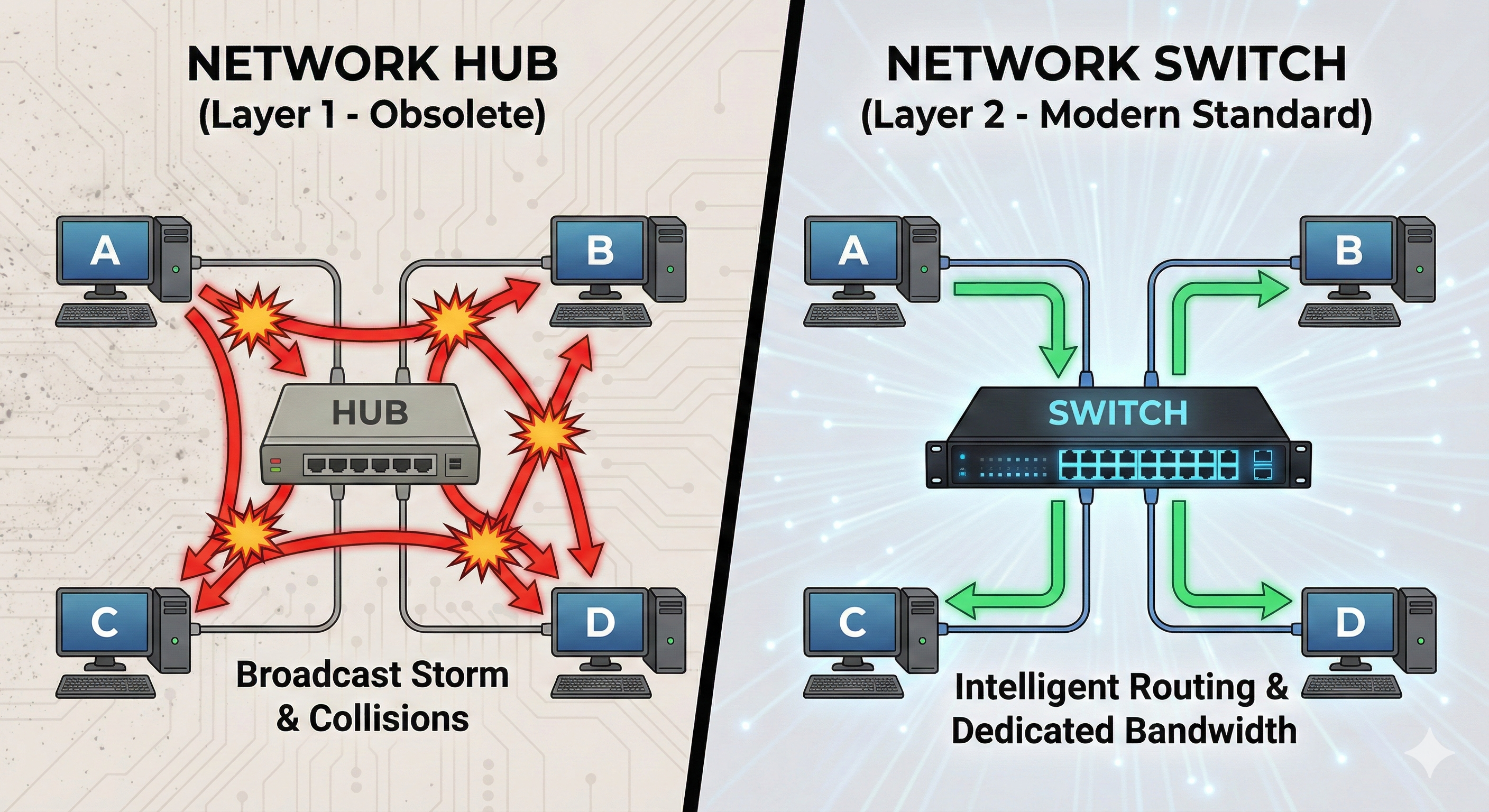
In technical terms, when a packet of data arrives at one port on a hub, the hub takes that electrical signal and blindly broadcasts it out to every other port on the device. It does not look at the data. It does not care who the intended recipient is. It just repeats the signal.
The Problem: Broadcast Storms and Collisions
This approach creates chaos. Every device on the network receives every piece of data, even if it's not for them. Their network cards have to process each packet, check if it's theirs, and discard it if it's not. This is incredibly inefficient.
Worse, hubs operate in Half-Duplex. This means a port can either send data OR receive data, but not both at the same time. Think of it like a walkie-talkie. If two devices try to speak at once, their signals crash into each other. This is called a Collision. When a collision occurs, both packets are destroyed, and the devices have to wait a random amount of time before trying to resend. As you add more devices, collisions increase exponentially, bringing network performance to a crawl.
The Network Switch: The Intelligent Operator
A Network Switch is a smart device that operates at Layer 2 (Data Link Layer). It has a brain and a memory.
How a Switch Works
Imagine the switch as a highly efficient, private telephone switchboard operator. When you first plug a device into a switch port, the switch learns that device's unique MAC Address. It builds an internal database called a MAC Address Table, mapping each MAC address to a specific physical port.
Now, when Device A wants to send data to Device B, it sends a "frame" that includes Device B's MAC address as the destination. The switch receives this frame, looks at the destination address, checks its MAC table, and sees that Device B is connected to Port 4.
Here is the magic: The switch creates a direct, private electrical connection between Port 1 (Device A) and Port 4 (Device B). It forwards the data only to that specific port. Other devices on the network (C, D, E) have no idea the conversation is even happening.
To visualize this fundamental difference, look at the diagram below.
The Benefits: Full-Duplex and Speed
Because each connection is private, there are no collisions. This allows switches to operate in Full-Duplex. Device A can send data to Device B at full speed, while simultaneously receiving data from Device C at full speed. In a modern 2.5GbE homelab, this is essential. A switch allows multiple pairs of devices to communicate simultaneously at their full port speed without interfering with each other.
The 2026 Reality: Why This Matters
You might ask, "Why are you telling me about hubs? You can't even buy them anymore." While it's true that you won't find a new hub on store shelves in 2026, the concept is vital for two reasons:
- Troubleshooting and Legacy Gear: You might stumble across old equipment in a surplus sale or a dusty closet. Plugging a 20-year-old hub into your modern multi-gigabit network is like putting square tires on a sports car. It will instantly become a massive bottleneck and create bizarre network issues.
- Understanding Managed Switches: In a 2026 homelab, we don't just use basic switches. We use Managed Switches. These advanced devices take Layer 2 intelligence even further. They allow you to use VLANs (Virtual Local Area Networks) to logically carve up one physical switch into multiple isolated networks. For example, you can put all your insecure IoT cameras on VLAN 20 and your main server on VLAN 10. The switch ensures that traffic from the cameras can never reach your server, even though they are plugged into the same box. This is a fundamental security practice that is impossible without understanding switch logic.
Conclusion: The Foundation of Your Lab
While containers and AI models get all the glory in the 2026 homelab scene, remember that your network is only as strong as its weakest link. A network hub is a relic of a time when bandwidth was scarce and intelligence was expensive. Today, silicon is cheap, and speed is non-negotiable.
Understanding that a switch is not just a "port multiplier" but an intelligent traffic director is the first step toward building a robust, high-performance, and secure home network. So, leave the hubs in the history books, invest in a decent Gigabit or 2.5GbE switch, and give your data the fast lane it deserves.